Oh, Amazon. It is the site that we all hate (at least, that all designers hate). And, because it is the household-name behemoth that really does have everything we need, it doesn’t have to get any better; we’ll still keep buying there.
(A polite word of caution for Amazon, though: Sears & Roebuck used to have the same kind of market power. Now it is a dingy afterthought. No monopoly lasts forever, and sooner or later, Amazon will actually have to care about its interactions and searchability.)
Amazon Video and its shiny sibling, Amazon Prime Video—the streaming/downloading service available to customers who have shelled out for an Amazon Prime membership—just might be the dark vision of Amazon’s unhealthy future.
As a retailer, Amazon can get away with being ugly, crowded, and obscure; as a video source, it can’t. It has too much competition in that arena.
THE PRODUCT
Amazon Video allows users to stream various kinds of content (movies, miniseries, television series) for various amounts of money. A consumer can purchase or rent video content.
Amazon Prime customers also have the option to stream video from the Prime Library, including Amazon original programming. A step up from that are paid subscriptions to channels, such as HBO at $14.99 a month or BritBox at $6.99 a month.
THE INTERACTIONS
We start, as always, with questions about the users. What does an Amazon Video customer want to be able to do? The answers are pretty straightforward, I think. It’s all derived from the one basic mission: Get people to watch stuff.
Here’s a list of my needs and desires, which I think are pretty typical.
- Search available content for items that will interest me
- Sample said content to see if it really does
- Read and/or leave reviews
- Wishlist/save for later
- Buy or rent premium content
All these are doable, though not effortless.
- Watch purchased, rented, or subscription content
This is sort of doable. Some kinds of purchased content are maddeningly difficult to access.
- Download & watch content
This is only possible on a mobile device.
THE PROBLEMS
AESTHETICS
I’m simply not going to deal with this. The horrors of Amazon’s cluttered home page have been more than adequately detailed elsewhere. A summary: There’s too much, it’s too distracting, it’s too random (for selections theoretically based on my browsing history, the items on the home page never seem to have anything to do with me), the colors are horrible, it’s impossible to customize.
Taking on the ugliness of Amazon’s presentation is picking the lowest-hanging fruit, and it isn’t structurally very important to the Video arm. I’m going to go a level deeper instead.
FINDING AMAZON VIDEO
Until just days ago this was not an insignificant hurdle. There was no obvious and intuitive way to get there; the very fastest navigation required two clicks.
And then, as if Amazon was actually paying attention to its customers and their needs, a new series of portals appeared just below the first big banner ad! (At least, it’s there if you are signed in and an Amazon Prime customer.) Now there are sizable, friendly links to AmazonSmile, Prime, Fresh, Video, Music, Alexa, etc. I’d like to be able to reorder them for my use patterns (there’s only one useful link visible for me without having to scroll horizontally), and I can’t see the whole image, but it’s much better than it was.
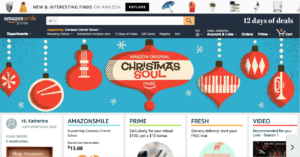
Look there, at the very bottom on the right. You can kind of see a direct link to Amazon Video! It’s a little pathetic that this half-visible, half-useful link is an exciting upgrade.
Before the revision I had written, “Considering the clutter of Amazon’s main page, one would think that adding a single link to Video would be trivial (though, admittedly, that would call for a similar link to Music).” I would gloat about my ability to anticipate Amazon’s entire staff of designers, except that the change was glaringly obvious and desperately needed.
They have left a wasted opportunity for a meaningful/useful interaction in the main nav menu. On the right, near the user’s login and account information, there is a navigation item for Prime. That suggests that there’s Prime content a click away—but there is only a drop-down teaser for a featured Prime item. There has got to be a better use for that extremely valuable screen space. Prime suggestions tailored to the individual user, perhaps?
rating: 7/10 (not bad at all!)
BROWSING

The initial Video screen gives me rows of content options to look through: below the banner is a selection of items from my Wish List, followed by a row of recommendations, followed by a row of something Amazon’s promoting (in the screenshot, NFL football), followed by original series, followed by … One gets the gist. The number of rows appears to be infinite. The first row—my Wish List—can be edited to tailor the selections to the user, but the rest can’t, which seems like a missed opportunity for Amazon to gather information about the customer and improve its recommendations.
My initial screen, for example, is crowded with kids’ selections, because I have a small child who I’m sometimes forced to amuse with television. I would love to be able to turn off the “family” recommendations, but I can’t.
Search in the Video section is visually quite distinct from regular Amazon product searches. That’s not necessarily a negative or a positive, but it is notable, and it creates a sense of Prime Video being a separate entity.
Finding and watching trailers is unnecessarily difficult. The trailer is sometimes only available in the mouseover/hover popup window, which is itself only sometimes available.
Search results cannot be sorted by customer rating or popularity, which is an obvious and basic need. The only parameters for ordering the results are Relevance (the standards of which are entirely obscure), Featured, or Newest Arrivals. Television series appear as full seasons, which are not listed in order. For instance, a search for Doctor Who produces Season 1 on top, as one might expect, followed by Seasons 9, 5, and 10.
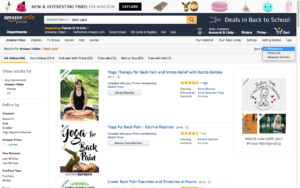
In the upper right of the main frame, you’ll see the drop-down menu for the display options, none of which are exactly optimal. Filters are on the left.
Results can be filtered by a limited number of parameters: channel, included with Prime, genre, theme, mood (unclear what the differences among these three are), decade of release, and a few others. Surprisingly, there is no MPAA rating. That seems as if it would be a painless addition, since the ratings already exist. Another invaluable filter would be length, also a readily available data point.
Synopses of results are not available without clicking into a particular entry. It’s puzzling as to why the mouseover popups aren’t engaged for results lists; it seems an obvious place where they would be valuable.
rating: 4/10 (unfriendly, but not downright hostile)
FINDING & WATCHING YOUR PURCHASES
If all you watch is movies, you’re fine. Navigate through Your Video Library >>> Movies, and there is the list of everything you’ve bought.
Television series? That’s a problem. A big problem. The Amazon Video site, and the Amazon Video app as well, affords its users no way to access a list of the TV episodes they have purchased.
Since that is mind-blowingly incompetent on the company’s part, let me say it again: There is no way to access a simple list of the TV episodes you own.
If I want to download episodes I own to another device, I have to navigate in my account to Orders, perform a sign-in, further navigate to Digital Orders, choose the right time period, and scroll through every digital purchase I’ve made, including apps, music, and movies, to find the purchase records for individual episodes. (There is no way to search your digital orders. The search window indexes only the real-world orders—though there’s no way to know that without testing the function.)
The video library page gives me icons for the show and season in which I own episodes, but it does not tell me which episodes I own. (If I own only one, the mouseover popup will tell me that, but only by episode number, not episode title.)
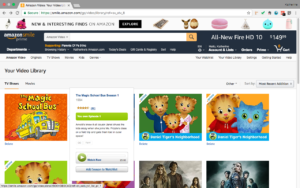
I apparently own one episode of this season, but strangely, I don’t have the entire list of episodes memorized. So when my child is howling, “I want ‘Neighborhood Storm’!” I have to click frantically through every Daniel Tiger season to find it. Thanks.
Within your library, the only way to discover which episodes you own is to navigate to the full season list and see whether a particular episode has a “Buy HD” button or a “More Purchase Options” button with a play icon. If the latter, you already own it, though of course that’s not clear. You have to know that you own the episodes in order for the difference to be meaningful at all.
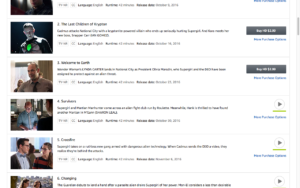
Wow, I own some of these! I think.
That method, flawed as it is, only works for shows that are not included with Prime. If a show is included with Prime, it’s got the “More Purchase Options” button for every episode. How do you figure out which episodes you own in that case? You click on the episode, of course, and if it has both a SD and HD purchase button, you haven’t bought it. If it has only an HD button, you own the SD version (and presumably vice versa, though I was unwilling to spend $2.99 to test this).
rating: 2/10 (critical: sends me to Netflix)
DOWNLOADING/WATCHING OFFLINE
You cannot download content onto your computer. Period. This means that you can’t watch purchased videos if you’re on an airplane or in some other wifi-less place.
It is possible to download content onto a mobile device, provided the device is supported. And, of course, providing you have enough free memory on your tablet or phone to store video files.
rating: 5/10 (not ideal, but not expected)
CONCLUSION/RECOMMENDATIONS
This UI is only acceptable if you watch your purchases on only one device, purchase and watch entire seasons rather than individual episodes, and have an internet connection available at all times.
The downloading issue is likely one of piracy prevention, and as such is not addressable without a major technological change. (It’s worth noting that the same problem occurred with Netflix until recently. While it is still not possible to watch Netflix content in your browser or media player while offline, there is now a Netflix app for Windows that allows downloading.) Every other problem I’ve pointed out, however, would be fixable, or at least ameliorated, with relatively minor adjustments to the UI.
The functionalities that the UI needs are already built, since they do appear in some places.
I use this service more than it deserves, given its deep flaws. I’d like to like it more than I do. Please, Amazon, please …